はじめに
2か月ほど前にChatGPTのPlusプランに加入した。理由は色々あるけど割愛する。
で、Codexを使えるようになったので、折角だから何か作ってみようと思い、「Spotifyでライブラリに登録している音源と、ローカルで持っている音源を一括で管理できるアプリ」を作っている。*1
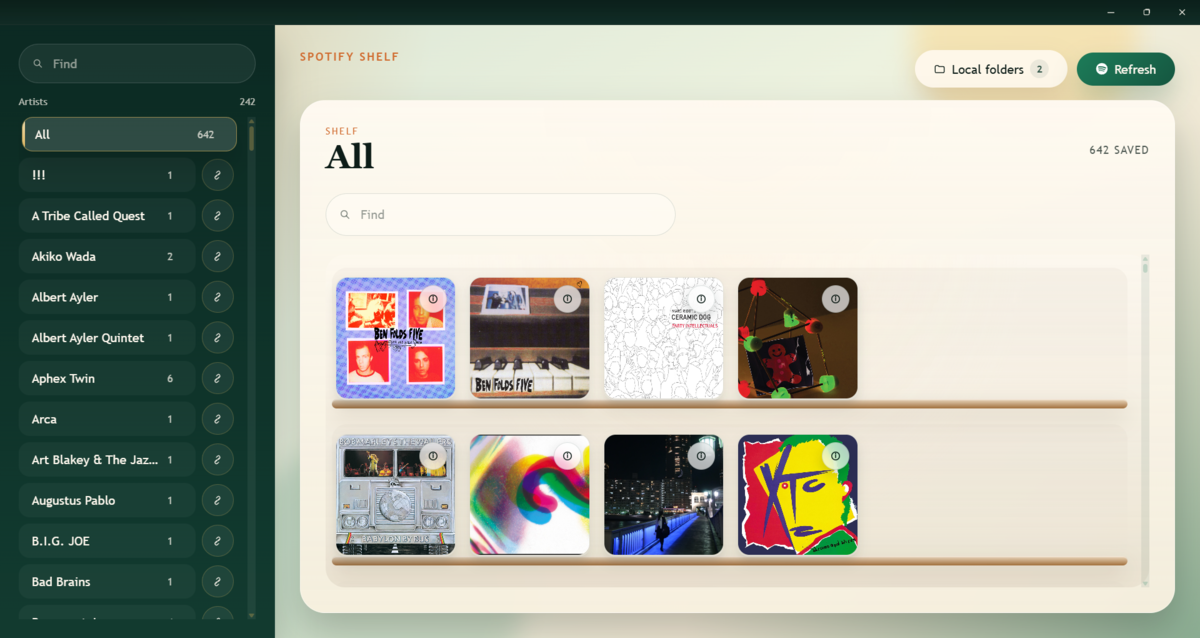
アーキテクチャとしてはTauri + Vite + Reactを採用したが、RustもReactも全然知らない。*2それでもプロンプトさえちゃんとしていればほとんどバグも出ずに動くので、感動するよりも先に「じゃあもう俺コード書かなくていいじゃん…」となった。
閑話休題。
基本的な機能は2日で実装が終わり、もう2日でAndroid版のビルドもできるようにした。世の中に公開するかどうかはあんまり考えてない。*3
後はちょこちょこと気に入らない部分を直してもらったり、パッと思いついたアホみたいな機能を雑に実装してもらうだけとなっている。
今回は「人間は気にいらねぇと思った部分とジャストアイデアを書き殴るだけ」で開発を進める方法をメモしておく。
初めにとっていた開発手法
最初はこんな感じのドキュメントを作っていた。
plan
│- PLAN.md
│- TODO.md
└─layout
    │- layout.md
    │- main-collapsed.excalidraw
    │- main-expanded.excalidraw
    └  main-search.excalidraw
PLAN.md:アプリ全体の設計方針TODO.md:CodexにPLAN.mdを読み込ませて作ってもらった実装計画。layout.md:各画面の説明。- モックとしてExcalidrawで作った
*.excalidrawファイル(実体はJSON)を用意しておき、細かいレイアウトはそっちを参照させるように指示している。
- モックとしてExcalidrawで作った
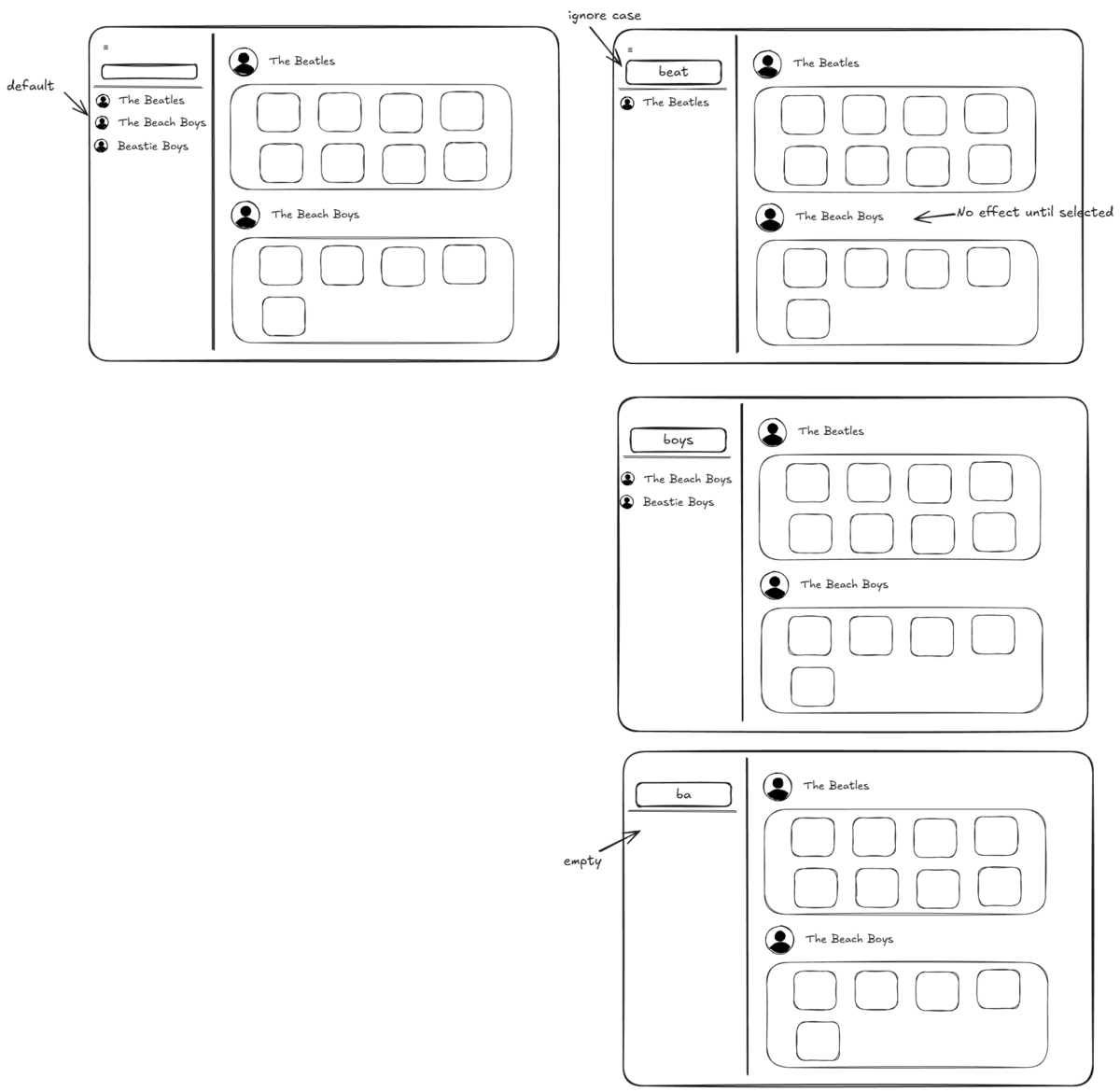
こんな雑な仕組みでもそれなりに回るのだけれど、以下のような問題が出てきた。
- エージェントに指示するたびにいちいち
PLAN.md/TODO.mdの全量を読みに行くのでトークン効率が滅茶苦茶悪い。 - やりたいこと(要件)は決まってるけど、仕様・設計に落とし込むのが面倒臭い。「そんなもんお前がやれ」と思うようになってきた。
TODO.mdの内容から何をするのか何となくわかるが、「それって具体的にどうやって実装するつもりなの?」となるものが度々出てくる。- そういう悪臭がするものは、人間でもAIでも「そうはならんやろ」となる実装が出てくるんだなぁ…と学んだ。
- 実際は自分が
PLAN.mdに書いた仕様が曖昧過ぎるのが原因。 - 「でも仕様詰めるのって面倒臭いよね…。」という悪循環。
- 実際は自分が
- そういう悪臭がするものは、人間でもAIでも「そうはならんやろ」となる実装が出てくるんだなぁ…と学んだ。
今やっている開発手法
で、大掛かりな構成変更を行って自分は「ここがクソ」「この機能が欲しい」とMarkdownに書くだけである程度回るような仕組みに再構築した。
docs
│- README.md  … docsディレクトリ内のファイル構成
├─decisions  … 設計に関する意思決定のログ。ADRは「Architecture Decision Record」の略
│  │- ADR-0001-XXX.md  … ADRの実体
│  │- ADR-0002-XXX.md
│  │- …
│  │- README.md  … ADRの運用ルール
│  └─templates
│        └─ ADR-template.md  … ADRのテンプレート
├─layout
│  │- index.md  … screensディレクトリ配下のレイアウトファイルの説明。
│  └─screens
│      │- album-detail.excalidraw  … Excalidrawで作ったモック
│      │- album-detail.md … 各画面の仕様・ルール・契約と、関連するADR
│      └─ …
├─planning
│  │- PLAN.md  … アプリの長期方針と実装基盤・データ・UIの原則
│  └─TODO.md  … 次にAIエージェントが行う作業内容
└─requirements
    │- accepted.md    … DISCONTENT.mdの内容から「実装・設計へ反映することを決めた要件」としてまとめたもの
    └─DISCONTENT.md  … アプリを触っていて感じた不満・要望。人間はこれだけ更新すればOK。
色々ファイルがあってややこしく見えるが、人間が触るのはrequirements/DISCONTENT.mdだけ。
他ファイルの更新は全部エージェントに任せる。
細かいフロー
- 人間が
DISCONTENT.mdに不平不満をぶちまける。 - エージェントが
DISCONTENT.mdから「まぁこれは実装してやるか…」と思ったものをaccepted.mdに落とし込む。 - エージェントが
accepted.mdの内容からdicisions/layout/planningの内容を更新し、具体的な実装方針をplanning/TODO.mdに書き込む。 - 人間は更新されたドキュメントの内容をレビューし、イメージと合っていたら
TODO.mdの作業を実施するよう指示する。- イメージと合わない部分があったら
accepted.mdやADRの内容をベースにエージェントと詳細について話し合う。
- イメージと合わない部分があったら
flowchart TD
    A[DISCONTENT.md]
    B[accepted.md]
    C[decisions/]
    D[layout/]
    E[planning/]
    F[planning/TODO.md]
    G[実装]

    A --> B
    B --> C
    C --> D
    D --> E
    E --> F
    F --> G

    F -.レビュー差分.-> B
Skillとの併用
当然このフローを毎回指示するわけにもいかないので、docs-triageとdocs-plan-syncという2つのSkillを使っている。
docs-triageはDISCONTENT.mdに記載された内容からaccepted.md / PLAN.mdの更新と、ADRの更新 / 生成を担当する。
docs-triage
---
name: docs-triage
description: Use this skill when the task is to process docs/requirements/DISCONTENT.md or other raw feedback notes into stable documentation. Trigger when asked to organize complaints, extract adopted requirements, propose or add ADRs, or turn exploratory notes into accepted.md/rejected.md updates. Do not use for code implementation. Do not use for routine TODO or layout updates unless they are direct consequences of requirement triage.
---

# Purpose
This skill governs the **requirements triage** workflow for the repository's documentation set.

Its job is to convert raw dissatisfaction notes, complaints, observations, and improvement ideas into stable, reviewable artifacts with minimal context bloat.

## Repository documentation model
Treat the documentation set as four layers:

1. **Raw input**
   - `docs/requirements/DISCONTENT.md`
   - This is the inbox and source log.
   - Preserve the user's voice when possible.
   - Do not over-edit for style.

2. **Accepted requirements**
   - `docs/requirements/accepted.md`
   - Contains only requirements that are judged worth carrying forward.
   - Keep concise and structured.

3. **Planning**
   - `docs/planning/PLAN.md`
   - Long-term product direction and durable design principles.
   - Do not put narrow one-off decisions here.

4. **Architecture decisions**
   - `docs/decisions/ADR-xxxx-*.md`
   - One decision per file.
   - Use when a requirement implies or depends on a concrete design or governance choice.

## Core rules
- `DISCONTENT.md` is a **raw log**, not a polished spec.
- `accepted.md` is the **stable shortlist** of requirements adopted so far.
- `PLAN.md` contains only **durable direction** and broad product / architecture intent.
- An ADR is required when a requirement implies a concrete answer to a design question.
- Prefer creating a new ADR over expanding `PLAN.md` with detailed implementation rationale.
- Preserve traceability: every accepted requirement should be traceable to one or more raw complaints or observations.

## When triaging raw notes
For each meaningful item in `DISCONTENT.md`, classify it into one of these outcomes:

- **accepted**: belongs in `accepted.md`
- **rejected**: belongs in `rejected.md` if that file exists and the rejection matters
- **defer**: leave in `DISCONTENT.md` only, optionally note as future consideration elsewhere
- **already-covered**: do not duplicate; instead tighten existing accepted requirement or ADR if needed

## What belongs in accepted.md
A requirement belongs in `accepted.md` only if at least one of these is true:
- It describes a recurring UX or product problem.
- It constrains future implementation.
- It is useful for future review by humans or agents.
- It materially changes task prioritization or screen behavior.

Do not copy brainstorming noise, implementation chatter, or low-signal one-off frustrations into `accepted.md`.

## accepted.md writing format
Use a compact, stable structure. Each requirement should be self-contained and easy to reference.

Recommended template:

```md
## R-XXXX: Short title
status: accepted
priority: high | medium | low
scope: screen / feature / system
source: DISCONTENT.md
summary: one-sentence problem statement
acceptance:
  - concrete observable outcome
  - concrete observable outcome
related:
  - ADR-XXXX
  - layout/screens/example.md
```

Guidance:
- Make the title problem-oriented, not solution-oriented, unless the solution is already fixed.
- Keep acceptance criteria observable.
- Keep each requirement narrow.

## When to create or update an ADR
Create or update an ADR when any accepted requirement needs a durable answer to questions like:
- Which source of truth should govern a screen or data flow?
- Which architecture, storage, or sync pattern should be used?
- Which UX rule is fixed across future changes?
- Which technical tradeoff has been consciously accepted?

Do **not** create an ADR for every UX wish. Create one only when there is an actual decision worth preserving.

## ADR writing rules
- One decision per file.
- Use 4-digit numbering.
- File name format: `ADR-0001-short-kebab-case-title.md`
- Status values: `proposed`, `accepted`, `superseded`, `deprecated`
- Keep the file short and decision-centric.
- Prefer consequences and review triggers over long narrative.

Use the template from `assets/ADR-template.md`.

## Updating PLAN.md
Only touch `PLAN.md` if raw notes reveal a change in durable product direction.

Examples that may justify a PLAN update:
- the product's primary user journey changes
- a platform strategy changes
- a major architectural pillar changes
- a long-term prioritization principle changes

Examples that do **not** justify a PLAN update:
- one screen needs a new control
- a single field should move
- a spacing or toolbar issue on one platform
- a detailed implementation sequence changes

## Output discipline
When performing triage:
1. Read the raw notes.
2. Identify unique issues.
3. Merge duplicates.
4. Update `accepted.md` only with adopted requirements.
5. Create or update ADRs only where justified.
6. Avoid inflating `PLAN.md`.
7. Do not rewrite unrelated files.

## Definition of done
The triage is complete when:
- `DISCONTENT.md` remains the raw source log
- `accepted.md` contains only adopted, deduplicated requirements
- any new durable design decision has its own ADR
- `PLAN.md` was changed only if long-term direction changed
- no routine TODO churn was introduced unnecessarily

## Files to inspect first
1. `docs/requirements/DISCONTENT.md`
2. `docs/requirements/accepted.md`
3. relevant ADRs in `docs/decisions/`
4. `docs/planning/PLAN.md` only if a long-term direction question appears

## Files to avoid touching by default
- `docs/planning/TODO.md`
- unrelated `docs/layout/screens/*.md`
- source code

## Template and examples
- ADR template: `assets/ADR-template.md`
- accepted requirement template: `assets/accepted-template.md`
- triage example: `assets/triage-checklist.md`
docs-plan-syncはdocs-triageで整理した要件・仕様をTODO.mdに落とし込みつつ、改めめて他のドキュメントを更新する必要がないかチェックする。
docs-plan-sync
---
name: docs-plan-sync
description: Use this skill when the task is to synchronize stable documentation into execution-ready planning artifacts. Trigger when asked to update PLAN.md, TODO.md, or layout screen docs from accepted requirements and existing ADRs. Use it for implementation planning and layout synchronization. Do not use it for raw complaint triage; use docs-triage for that.
---

# Purpose
This skill governs the **planning sync** workflow.

Its job is to turn already-accepted requirements and existing ADRs into a small, execution-ready set of planning artifacts with minimal token overhead.

## Documentation model
Treat the documentation stack as layered inputs and outputs:

### Inputs
- `docs/requirements/accepted.md`
- relevant ADRs in `docs/decisions/`
- relevant screen docs in `docs/layout/screens/`
- existing `docs/planning/PLAN.md`
- existing `docs/planning/TODO.md`

### Outputs
- updated `docs/planning/PLAN.md` only if durable direction changed
- updated `docs/planning/TODO.md` as a short near-term queue
- updated `docs/layout/index.md` only if navigation / indexing changed
- updated `docs/layout/screens/*.md` only for affected screens

## Core rules
- `accepted.md` is the source of adopted requirements.
- ADRs are the source of durable design decisions.
- `PLAN.md` should stay stable and strategic.
- `TODO.md` should stay short and operational.
- `layout/screens/*.md` should explain screen intent, fixed UI rules, and notable constraints.
- Do not expand planning files into prose logs or status history.

## PLAN.md rules
`PLAN.md` should contain only:
- product direction
- broad architecture principles
- durable UX principles
- platform strategy
- major sequencing / roadmap logic

Do **not** place the following in `PLAN.md`:
- step-by-step implementation procedures
- narrow UI tweaks
- issue logs
- repeated rationale already preserved in an ADR
- completed tasks

When in doubt, prefer leaving `PLAN.md` unchanged.

## TODO.md rules
`TODO.md` is a **near-term execution queue**, not a full project ledger.

Keep it small:
- ideally 3 to 7 active items
- each item should be implementation-sized
- each item should point to the relevant requirement and ADR
- remove or archive completed work rather than accumulating history here

Recommended task format:

```md
- [ ] Short implementation task
  - refs: R-XXXX, ADR-XXXX
  - targets: path/or/screen
  - done when:
    - observable outcome
    - observable outcome
```

Use the template from `assets/todo-template.md`.

## Layout synchronization rules
Use `docs/layout/index.md` as a lightweight index only.

Use `docs/layout/screens/*.md` for per-screen detail.
Each screen file should contain:
- purpose
- primary user actions
- fixed layout / interaction rules
- constraints from ADRs or accepted requirements
- references to companion `.excalidraw` files if present

Do not place broad product strategy inside screen docs.
Do not duplicate full accepted requirements if a concise reference is enough.

## When to update layout docs
Update a screen doc if one of these is true:
- the accepted requirement changes visible behavior on that screen
- an ADR changes a fixed UI rule or source of truth
- the screen purpose or major actions changed

Do not update layout docs for purely backend changes unless user-visible behavior changes.

## Synchronization procedure
1. Read `accepted.md`.
2. Read only the ADRs relevant to the changed area.
3. Identify whether the change affects strategy, near-term work, or screen behavior.
4. Update `PLAN.md` only if strategy changed.
5. Update `TODO.md` with only the next implementation-sized tasks.
6. Update `layout/screens/*.md` only for impacted screens.
7. Keep `layout/index.md` terse and navigational.

## Definition of done
The sync is complete when:
- `PLAN.md` remains strategic and compact
- `TODO.md` contains only the near-term queue
- each active task traces back to accepted requirements and/or ADRs
- only impacted layout docs were changed
- no raw feedback or decision rationale was duplicated unnecessarily

## Files to inspect first
1. `docs/requirements/accepted.md`
2. relevant `docs/decisions/ADR-*.md`
3. `docs/planning/PLAN.md`
4. `docs/planning/TODO.md`
5. affected `docs/layout/screens/*.md`

## Files to avoid touching by default
- `docs/requirements/DISCONTENT.md`
- unrelated ADRs
- unrelated screen docs
- source code, unless the user explicitly asked for implementation too

## Output style
- Prefer edits over rewrites.
- Preserve stable headings when possible.
- Keep queue items concrete and reviewable.
- Make references explicit: `R-XXXX`, `ADR-XXXX`, and screen paths.

## Template and examples
- TODO template: `assets/todo-template.md`
- screen template: `assets/layout-screen-template.md`
- plan sync checklist: `assets/plan-sync-checklist.md`
Skillのトリガー
「SkillはAGENTS.mdと違って強制力はない」というのは知っての通りだが、少なくともCodexにおいてはプロンプトに${Skill名}と入力しておくと確実にそのSkillを使ってくれる。*4
なので
$docs-triage DISCONTENTを更新しました
とか
$docs-plan-sync TODO.mdの内容を実装して
といったプロンプトを投げれば良く、トリガーは意識しないで良い。
まとめ
もちろんこれで常に完璧なコードが出てくるというわけではなく、ちゃんとアウトプットされたものの品質を担保するための仕組みは別で用意しないといけない*5が、少なくとも仕様についてあれこれ考えたり、どう実装するかなどを考えるのはほとんどAI任せにできるようになった。
とはいえ、この手法は
- 個人で開発している
- 自分が欲しい機能が実装されればそれでいい
という「要件・仕様を決められる権限」が自分一人に集約しているからできることだと思う。
企業で何かプロダクトを作ったり、チームで開発するなら別の方法を取った方が多分良い。
*1:自分は音楽サブスクとしてSpotifyを使っているのだけれど、世の中には配信されていない音源が大量にある。廃盤だったり、契約関係の都合だったり、そもそも最初から配信されていなかったり。Spotifyにもモバイル版ならローカルファイルを扱う仕組みがあるが、操作性は本当にゴミなので困っていた。
*2:もちろんどういう特性を持っているかぐらいは知識として知っているが、コードを書いたことはない。
*3:そもそも利用者がSpotifyのプレミアム会員じゃないとまともにAPIが使えないので、そんなに需要がないんじゃないかなぁ…と思っている。
*4:Claude Codeは使ったことがないので知らない。ありそうだけどね。
*5:よく言われている「絶対テストしろ」だけでなく、「RustやReactのベストプラクティスを考えた上でセルフレビューしろ」といったAGENTS.md / Skillを入れてたりする。
